The CreoPop is a 3D pen, like the3Doodleryou may have seen before. It does the same thing. But, technically, it’s a very different device.
The 3Doodler uses heat to melt its building material, like a 3D printer. As it cools, it hardens. The second version of the 3Doodler is due out in June, for $100.
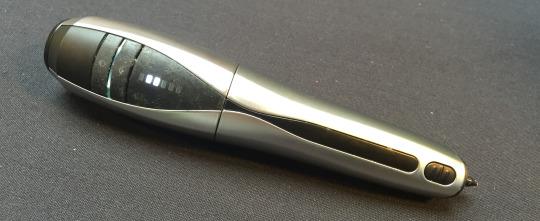
The CreoPop (photo above), which won’t be available for a few months, uses visible light to harden a highly proprietary gel “ink” that it extrudes. That means two things:
First, you can draw in the palm of your hand (if you can hold still). I drew a little 3D sketch on top of my thumbnail. As I slowly moved the pen through space, the strand of material first adhered to my thumbnail, then hardened as I moved the pen. Like an ordinary pen, the ink came out when I moved the pen, and stopped when I held still. There weren’t any buttons to press when the pen was on (you have to hold down a button on the 3Doodler to heat the ink). And the sketch I made just popped off my thumb when wanted to be done with it.
Second, the special 3D ink is where this company will really make its money. The “pen” will ship at first for $119. Inks will start at $20 for a three-pack of cartridges, which CreoPop CEO Andreas Birnik says are good for about 45 feet of drawing each.
A diversion for math: Creo “ink,” at the above price, is about 15 cents a foot. That’s not a lot, if you ask me, but 3Doodler ink packs are available for as little as $10 for a 25-pack of 10-inch strands, each of which is said to be able to print 100 inches. That means its ink costs less than 5 cents a foot. If you want to do a lot of 3D free-hand drawing, the 3Doodler will save you money.
While I don’t think the Creo charges a bad price for its magic, if you get this pen you will be at the mercy of the company to get the ink, since it’s very clear the there are no plans to open up the chemistry for making it. (I’m told that while the ink is nontoxic when you get it, the manufacturing process is quite tricky and perhaps not so friendly.)
Creo can also blend interesting materials into its ink. The thumb cube I drew smelled like watermelon, because I was using one of their scented inks. I also saw magnetic ink, glow-in-the-dark ink, and mood ink (it changes color when warmed up). “We use nano-particles,” Birnik told me.
The most interesting idea for a special ink isn’t available yet, though: Conductive ink. So you could 3D-draw a wire between two components. For fun, or maybe even for quick repairs of electronics.
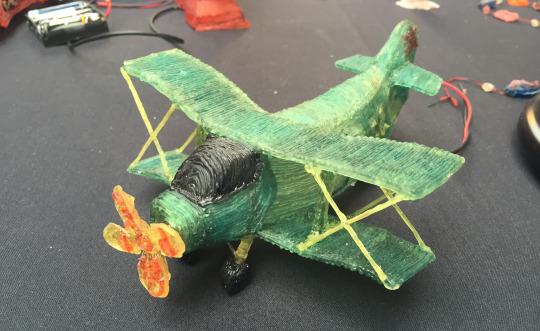
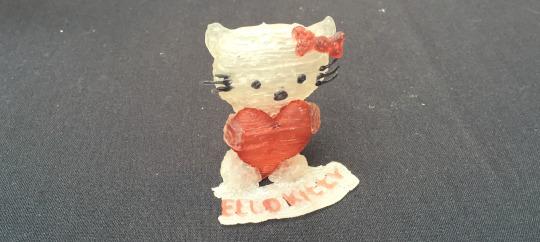
I don’t know if anyone needs a CreoPop. It’s not like you can make highly precise parts for projects, as you can with a 3D printer. Even the company’s own sample models (photos above) looked pretty rough. But it is a very cool gadget, and we don’t yet know how artists and crafters might figure out how best to use it.
Preview based on pre-production Canon EOS 5D S & SR Canon has added to its EOS 5D range with the launch of two 50MP cameras, the 5DS and the 5DS R. Both cameras are high-resolution full frame models, primarily aimed at stills photographers. The only difference between the models is that the 'S' has an optical low-pass filter, while the 'S R' has a self-cancelling filter (the same relationship as Nikon's D800 and D800E models shared). The two cameras will exist alongside the EOD 5D Mark III, acting as dedicated high-resolution cameras primarily intended for studio, landscape and wedding shoots, rather than the all-round capability offered by the existing model. The Mark III still trumps the S and S R in terms of maximum ISO and continuous shooting speed. Slightly unusually for Canon, both models have been announced a long way ahead of their June 2015 availability date, so we wouldn't be surprised if some of these details changed between now and t...
Nothing comes close to the 5Ds' resolution. Also notable is that, for the first time (ever?), a full frame Canon EOS DSLR has a pixel density nearly as high as or higher than the highest resolution APS-C sensors. With a pixel pitch that essentially matches the EOS sensor densities found in the 70D and 7D Mark II, the 5Ds effectively erases the "reach" advantage formerly always held by APS-C DSLRs. Yes, the announced-at-the-same-time Rebel T6i and T6s have slightly higher density sensors (3.7µm vs. 4.14µm), but the density difference is not big and the camera model capability difference is huge. No longer is the 7D Mark II's pixel density an advantage for reach reasons – or for angle of view reasons. If you want an APS-C camera's 1.6x narrower angle of view, simply use the 5Ds' 1.6x center crop mode with 19.6 megapixel (5424 x 3616) images captured. Prefer the old 1D 1.3x framing? No problem as that crop mode is also available with 30.5 megapixel (6768...
Comments
Post a Comment